Introduction to OCaml
(see the file ocaml-intro.ml if you want all of the ml examples in this file extracted out. See ocaml-intro.md for the Markdown which you can Preview in VSCode like I am doing in lecture)
Installing OCaml
- See the Coding page for install instructions and lots of other information.
- Make sure to use the required version of OCaml, 5.5.0, install all the libraries listed via
opam, and change your.ocamlinitfile as mentioned on that page.- This will let us all “play in the same sandbox” and avoid confusion
The Ecosystem via Hello World in OCaml
- Before getting into the details of the language we will cover the ecosystem at a high level
The top loop
- Top loops allow you to type in small snippets of code which will run and produce a result.
- e.g. shells like
bash, Python’spython3, JavaScriptnode, etc.
- e.g. shells like
- The OCaml top loop is started with the shell command
utop. - Here is an example of typing an expression
3+4into the top loop and running it. You must follow your input with;;, and then hit return, to indicate end of input
utop # 3+4;;
- : int = 7
- Control-D will exit
utop.
The Standalone Compiler
- The
ocamlccompiler is the analogue of thecc/gcc/javaccompilers you have used- Compilers translate source code to a binary which you can then run from the shell.
- In OCaml it is useful to live in both worlds: both play with code in a top loop, and use a compiler to compile it to a binary.
- Let’s cover how we will compile in OCaml. Suppose the following is in a file
helloworld.ml:let hw = "hello" ^ "world";; Printf.printf "the string is %s\n" hw - The actual compiler is
ocamlcorocamlopt, but we will never be directly invoking it - Instead we will operate at a higher level and use build tool
duneto invoke the compiler duneis a modernmake/Makefileequivalent for OCaml which is very powerful.
We have made a little project with all the right files in the right places, see helloworld.zip. We will review these files in lecture, here is an overview.
- In the top directory there should be a
dunefile with the following contents:(executable ; create an executable (name helloworld) ; need to give it a name (modules helloworld) ; it consists of just one module, helloworld.ml ) - This is the build file, specifying how to compile/test/run the program.
- The notation is S-expressions, a very old textual format from Lisp that is an alternative to JSON.
- Also a file
dune-projectis needed with only(lang dune 3.24)in it. - Now, type
dune buildto compile thishelloworld.mlcode as an executable. - All of the results are placed in a new
_build/sub-directory - Then, run with
dune exec ./helloworld.exe- same as typing_build/default/helloworld.exe - We will use
duneto build libraries and binaries, andutopto play with them.
OCaml Language Basics in utop
- We will start with OCaml by running tiny examples in the top-loop, but for the first assignment you will be working in both worlds.
Integers
3 + 4;; (* outputs `- : int = 7` -- the value is 7, int is the type, "-" means no name given *)

let x = 3 + 4;; (* outputs `val x : int = 7` - give the result value a name, via let. *)

let y = x + 5;; (* the above defines `x`, so can use it subsequently *)

let z = x + 5 in z - 1;; (* let .. in defines a local variable z *)
(* z is not defined after the `in` is over: z + 1 ;; will give an error. *)
Boolean operations
let b = true;;

b && false;;

true || false;;

1 = 2;; (* equality comparison, not ==; can compare at any type with = *)

1 <> 2;;  (* <>, not !=, for not equal *)
Don’t use != or ==, those ask if its an identical object in memory and that is basically never what you want in OCaml
Other basic data – see documentation for details
4.5;; (* floats *)

4.5 +. 4.3;; (* float operations are +. etc not just + which is for ints only.  Why? type inference! *)

30980314323422L;; (* 64-bit integers *)

'c';; (* characters *)

"and of course strings";;
Simple functions on integers
Let’s declare a function squared with x as its one parameter. return is implicit.
let squared x = x * x;; (* outputs `val squared : int -> int = <fun>` *)

squared 4;; (* this calls the function -- separate arguments with S P A C E S - ! *)
- OCaml has no
returnstatement; value of the whole body-expression is what gets returned - Type is automatically inferred and printed as
domain -> range;int -> inthere. - OCaml functions in fact always take only one argument - ! multiple arguments can be encoded (covered later)
Fibonacci series example - 0 1 1 2 3 5 8 13 ...
Let’s write a well-known function with recursion and if-then-else syntax
let rec fib n = (* the "rec" keyword needs to be added to allow recursion *)
  if n <= 0 then
    0 (* e.g. just write `0` to return `0`, not `return(0)` *)
  else if n = 1 then
    1
  else
    fib (n - 1) + fib (n - 2)
;;

fib 10;; (* get the 10th Fibonacci number; 2^10 steps so don't make input too big! *)
- Nested conditionals as above are generally avoided in OCaml since they are not very readable.
- Here is an easier-to-read
fibusing patternmatchnotation similar to Java/Cswitch(we will covermatchin detail later):
let rec fib x =
  match x with
  | 0 -> 0
  | 1 -> 1
  | n -> fib (n - 1) + fib (n - 2)
;;
Functions are just values like integers and booleans
- Key feature of FP: functions can be put in variables, passed and returned from other functions, etc.
- There is no need to give functions a name, they can be very short-lived and it can be cumbersome to name them all
- Much of this course will be showing how this is useful
let add1 x = x + 1;; (* the normal way to define an add1 function in OCaml *)

add1 3;;

let add1' = (function x -> x + 1);;  (* another way: define a `function` value and put in a regular variable *)

let add1'' = (fun x -> x + 1);;      (* equivalent shorthand -- cut off the "ction" *)

add1'' 3;;

(add1'' 4) + 7;;

((fun x -> x + 1) 4) + 7;; (* can inline so function NEVER named; useful when passing one function to another *)
- Multiple argument functions - just leave s p a c e s between multiple arguments in both definitions and uses
let add x y = x + y;;

add 3 4;;

(add 3) 4;; (* same meaning as previous application -- two applications, " " associates LEFT *)

let add3 = add 3;; (* No need to give all arguments at once - !
                      Type of add is int -> (int -> int) - "CURRIED" *)
add3 4;;

add3 20;;

(+) 3 4;; (* Putting () around any infix operator turns it into a prefix function *)
- Conclusion:
addis a function taking an integer, and returning a function which takes ints to ints. - So, add is a higher-order function: it returns a function as result.
- Other higher-order functions can take functions as arguments (e.g. the math compose example
o)
Observe int -> int -> int is parenthesized as int -> (int -> int) – right associativity which is opposite of arithmetic operators
Be careful with operator precedence in the unusual way that function application doesn’t need parens!
add3 (3 * 2);;

add3 3 * 2;; (* NOT the previous - this is the same as (add3 3) * 2 - application binds TIGHTER than `*` *)

add3 @@ 3 * 2;; (* LIKE the original - @@ is like " " for application BUT binds LOOSER than all other ops *)
Declaring Types
If you want to declare a type instead of letting it be inferred:
- Replace parameter like ` x ` with ` (x : int) `
- Put a final ` : int ` at the end for the return type of a function:
let add (x : int) (y : int) : int = x + y;;
- We give you the types in the headers in the HW to help you start
- In writing your own code you can initially leave them out but then paste in what was inferred
- Generally for all but simple one-off code you want types declared in function headers
- You can see the types for inferred things by hovering over but it gets annoying after awhile
Simple Structured Data Types: Option and Result
- Before getting into “bigger” data types like lists and trees, let’s use one of the simplest structured data types, the
optiontype.
Some 5;;
- : int option = Some 5
- All this does is “wrap” the 5 in the
Sometag - Observe the type is
int option, it is “optionally an integer”.
None;;
- : 'a option = None
- Notice these are both in the
optiontype .. either you haveSomedata or you haveNone. optionis similar to how you can have null or non-null objects in other languages, but it is more explicit.- These kinds of types with the capital-letter-named tags are called variants in OCaml; each tag wraps a different variant.
- The
optiontype is very useful; here is an oversimplified example.
# let nice_div m n = if n = 0 then None else Some (m / n);;
val nice_div : int -> int -> int option = <fun>

# nice_div 10 0;;
- : int option = None

# nice_div 10 2;;
- : int option = Some 5
- This allows an explicit failure value,
None, to be propagated - But,
Noneis not likeNULL– you can’t usenice_divdirectly in the place of/:
# (nice_div 5 2) + 7;;
Line 1, characters 0-14:
Error: This expression has type int option
       but an expression was expected of type int
- Notice the type of the return value of
nice_div, it isint option, notint - This type error is saying the
+lhs needs to be typeintbut is aSomevalue which is not anint.
Here is a failed attempt at solving this problem:
# let not_nice_div m n = if n = 0 then None else m / n;;
Line 1, characters 47-52:
Error: This expression has type int but an expression was expected of type
         'a option
The then and else branches must return the same type, here they do not: int and int option are disjoint types.
Using pattern matching to use nice_div
Here is how we can in fact use nice_div:
# match nice_div 5 2 with
  | Some i -> i + 7 (* the nice_div result is (Some 2) and i is bound to the 2 by this pattern *)
  | None -> failwith "This should never happen, we divided by 2";;
- : int = 9
- The big picture here is we don’t know if a
Someor aNonewill return so we must case on that matchis how we destruct option values in OCamlmatchis similar toswitchin C/Java/.. but is much more flexible in OCaml- The LHS in OCaml can be a general pattern which binds variables (the
ihere), etc
Moral from the above example
- Use of
optioncan make a little more code but it is more exact/rigorous/debuggable than using aNULLvalue - It also puts more information in the type itself – a function returning
int optiontells the caller they need to case on it.
Result
A very similar approach to the above is to use the result type
resultis likeoptionbut is specialized for error handling.- (We will very quickly go through this since it is so similar to
option)
# let nicer_div m n =
  if n = 0 then
    Error "Divide by zero" (* main difference of `result`: can return information about the error *)
  else
    Ok (m / n)
;;
val nicer_div : int -> int -> (int, string) result = <fun>
- The
resulttype is explicitly intended for this case of failure-resultOkmeans the normal result, same purpose asSomeErroris the error case, which unlikeNonecan include failure data, usually a string.
# match nicer_div 5 2 with
  | Ok i -> i + 7
  | Error s -> failwith s;;
- : int = 9
To complete the picture there is a third way to handle divide by zero, raise an exception:
let div_exn m n =
  if n = 0 then
    failwith "divide by zero is bad!"
  else
    m / n
;;

div_exn 3 4;;
- This has the positive property of not needing a match on the result.
- (Note that the built-in
/also raises an exception.) - But, exceptions are side effects and we want to minimize their usage to avoid error-at-a-distance.
- The above examples show how exceptional conditions can either be handled via exceptions or in the return value;
- A key dimension of this course is minimizing side effects such as exceptions
- Many bugs, security leaks, etc are due to ignorance of side effects; the
Error/Okapproach keeps them “in your face” by being in the return type - Also recall
Error/Okkeeps us completely in math-land, the return result tells everything. Exceptions are not math.
Lists
- Let’s use a real data structure to write some real programs
- Lists are the most common data structure in OCaml, similar to dictionaries/objects for Python/JavaScript.
- They are immutable so while they look something like arrays or vectors they most certainly are not
Building lists
Lists are represented internally as binary trees with left children always leaves.
let l1 = [1; 2; 3];; (* notice the type here is `int list` a list of integers *)
let l0 = 0 :: l1;; (* "::" is 'consing' 0 to the top of the tree - fast *)
l1;; (* observe that l1 didn't change, its data is just shared with l0 *)
Here is a picture of the trees used to internally represent l1 and l0:
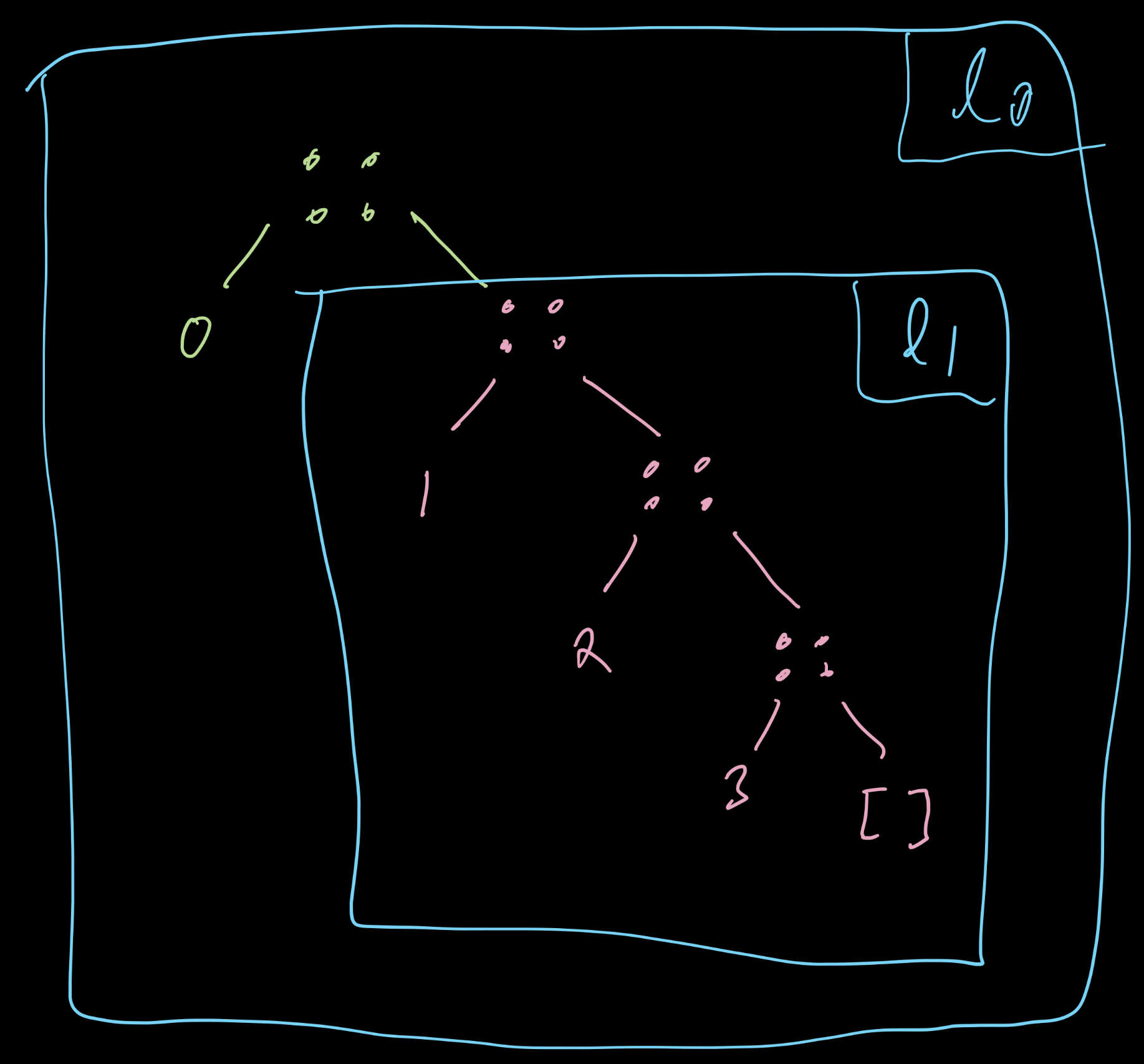
Notice how they share the l1 portion, this is one way functional programming is faster.
- Data that you know will never change can be freely shared behind the scenes.
Some more features of lists via some examples
let l1' = 1 :: (2 :: (3 :: [])) in l1 = l1' ;; (* [1;2;3] is just sugar for serial consing *)

let l2 = ["a"; "b"; "c"];; (* list elements can be of any type *)

let l3 = [1; "a"];; (* error - all elements must have same type *)

let l5 = [];; (* the empty list *)

[1; 2; 3] @ [4; 5];; (* `@` appends lists - slower than `::`, needs to cons 3/2/1 on front of [4;5] *)
Destructing Lists with Pattern Matching
- Here is a simple example of how a list can be analyzed
- This function gets the tail, the list without the first element
- which is the right subtree of the tree representation of the list
- Key to analyzing lists is pattern matching via
match, breaking list into head and tail portions- aka left and right subtrees
let tl l =
  match l with
  |  [] -> invalid_arg "empty lists have no tail"
  |  h :: t -> t  (* the pattern h :: t  binds h to the first elt (left subtree), t to rest (right subtree) *)
;;

let l = [1;2;3];;

let l' = tl l;;

l;; (* lists are immutable, so l didn't change *)

let l'' =  tl l' (* To get tail of tail, take tail of l' .. build on value returned from previous op *)

tl [];; (* Raises `invalid_arg` exception if the list had no tail *)
Note that an alternative to avoid the exception effect is to return Ok/Error (or, Some/None):
let tl' l =
  match l with
  |  [] -> Error "empty list has no tail"
  |  h :: t -> Ok t
;;

let l = [1;2;3];;

let l' = tl' l;;

tl' [];;

let l'' = tl' l' (* Oops this fails!  As in the div example above need to match on `Ok/Error` *)
Recursive Functions on Lists
- For the first homework many of the functions you need to write work on list inputs.
- There is no
fororwhilefor iterating down the list; you will need to use recursion.- (Recall that no mutation is allowed on any of the homeworks.)
- Recall the keys to programming with recursion:
- Recurse on smaller data
- Assume your function will “work” (return the expected result) on that smaller data
- Its just the coding version of the principle of induction in math
Here is an example of how to get the nth element of a list
let rec nth l n =
  match l with
  |  [] -> invalid_arg "there is no nth element in this list"
  |  hd :: tl ->
    if n = 0 then
      hd
    else
      nth tl (n-1) (* "the nth element of l is the (n-1)-th element of tl" *)
;;

nth [33;22;11] 1;;

nth [33;22;11] 3;;
Key points
- Pattern match on the list input: its either empty or is a head/tail pair (take the tree view)
- Recursively call the function on the tail of the list (plus other arguments)
- It should work for shorter lists by induction
Fortunately many common operations are already in the built-in List module:
# List.nth [1;2;3] 2;;
- : int = 3
- On Assignment 1 you cannot use
List, you first need to practice usinglet rec.- On Assignment 2 you will start using the
Listlibrary.
- On Assignment 2 you will start using the
Note that like our implementation List.nth will not be happy if there is no nth element:
# List.nth [1;2;3] 5;;
Exception: Failure "nth".
But there is a version in the library which returns an option type for this:
# List.nth_opt [1;2;3] 5;;
- : int option = None

# List.nth_opt [1;2;3] 1;;
- : int option = Some 2
An Example of a function both taking and returning a list
- Goal: write a function to zero out all the negative elements in a list of integers
- C etc solution:
for-loop over it and mutate all negatives to 0 - OCaml immutable list solution: recurse on list structure, construct a completely new list with the negative elements zeroed
let rec zero_negs l =
  match l with
  | [] -> []
  | hd :: tl -> (if hd < 0 then 0 else hd) :: zero_negs tl (* assume by induction that zero_negs tl will properly zero tl *)
;;

zero_negs [1;-2;3];;